Table of Contents
The Shrew Soft VPN Client for Windows is a free VPN client for Windows 10, 8, 7, Vista and XP. It runs on 32 bit and 64 bit platforms.
The Shrew Soft VPN client has not yet been adapted to the current internal architecture of Windows 11 for connecting network adapters. As a result, issues may arise when establishing a connection following changes to the network adapters or during the major biannual Windows updates. In this case, uninstall the Shrew Soft client, restart Windows, and reinstall it. Your VPN settings will remain intact.
![[Hint]](../images/admon/note.png) | Hint |
|---|---|
Since the Shrew Soft VPN Client has not been updated for some time and does not support IKEv2, it is no longer recommended for new installations. |
You can download the latest version from this URL: https://www.shrew.net/download/vpn
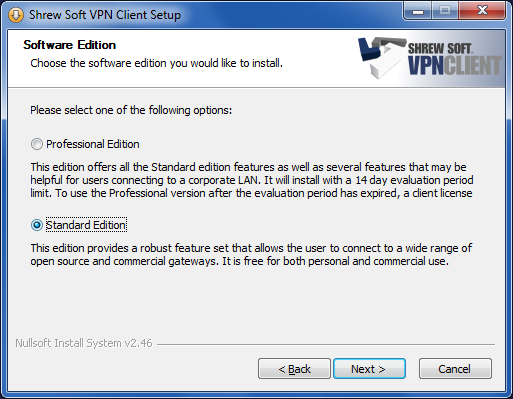
During installation, select "". This contains all functions necessary for the connection to the Intra2net system.
Prepare the Intra2net system for a connection with VPN clients first as described in Section 46.2, „Preparing the configuration on the Intra2net system“. After that the complete configuration for the client can be generated by the Intra2net system as described in Section 46.3, „Automatic configuration for clients on the Intra2net system“.
Transfer the newly created configuration file to the client PC, e.g. as an email attachment. Provide the user with the password that protects the private key in another way, e.g. personally on site. For security reasons, do not send this password by email.
Start the VPN Access Manager and go to the menu "". Select the file created by the Intra2net system with the extension .vpn and import it.