Table of Contents
- 45.1. Configuration conflicts during migration
- 45.2. Differences between strongSwan versions 4 and 6
- 45.2.1. Support for IKEv2
- 45.2.2. Pre-Shared key: The remote peer's IP address as the IKE ID
- 45.2.3. Grouping connections to the same remote peer
- 45.2.4. Handling of Perfect Forward Secrecy (PFS) for Phase 2
- 45.2.5. mode config push vs. pull
- 45.2.6. Welcome message for VPN clients via mode config
- 45.2.7. Hex encoding for Pre-Shared Keys
- 45.2.8. Fragmentation of IKE packets
- 45.2.9. NAT Traversal is always enabled
The Intra2net system implements IPSec key negotiation using the strongSwan service. Starting with Intra2net System version 7.0.4, you can choose between different versions of strongSwan in the "" menu.
Older Intra2net system versions exclusively used variants of strongSwan version 4. From version 7.0.4 onwards, strongSwan 6 is also available. The option to choose between these strongSwan versions will persist across several future releases of the Intra2net system.
Newly installed Intra2net systems, as well as those with no previous IPsec VPN configuration, use strongSwan 6. For all other systems, updating to Intra2net System version 7.0.4 or later will not automatically change the version of strongSwan currently in use.
strongSwan 6 is a prerequisite for using the recommended IKEv2. In addition, strongSwan 6 receives more frequent updates. Therefore, we plan to migrate all Intra2net systems to strongSwan 6 in a future update. Please refer to the release notes for the respective versions of the Intra2net system.
We therefore recommend that all users begin testing the switch to strongSwan 6 now. If any issues arise, you can still easily revert to the previous version and address the problems at your leisure, for example, with the assistance of your Intra2net partner and support.
When upgrading to strongSwan 6, certain configuration scenarios that previously triggered a warning will now result in errors that prevent the configuration from being saved. This primarily affects the configuration of multiple VPN tunnels to the same peer.
When using strongSwan 6, all shared settings for these connections to the same peer must be identical in this case. Only the tunnel settings may differ.
If such a configuration problem occurs, it will manifest itself in a manner similar to what is shown here:
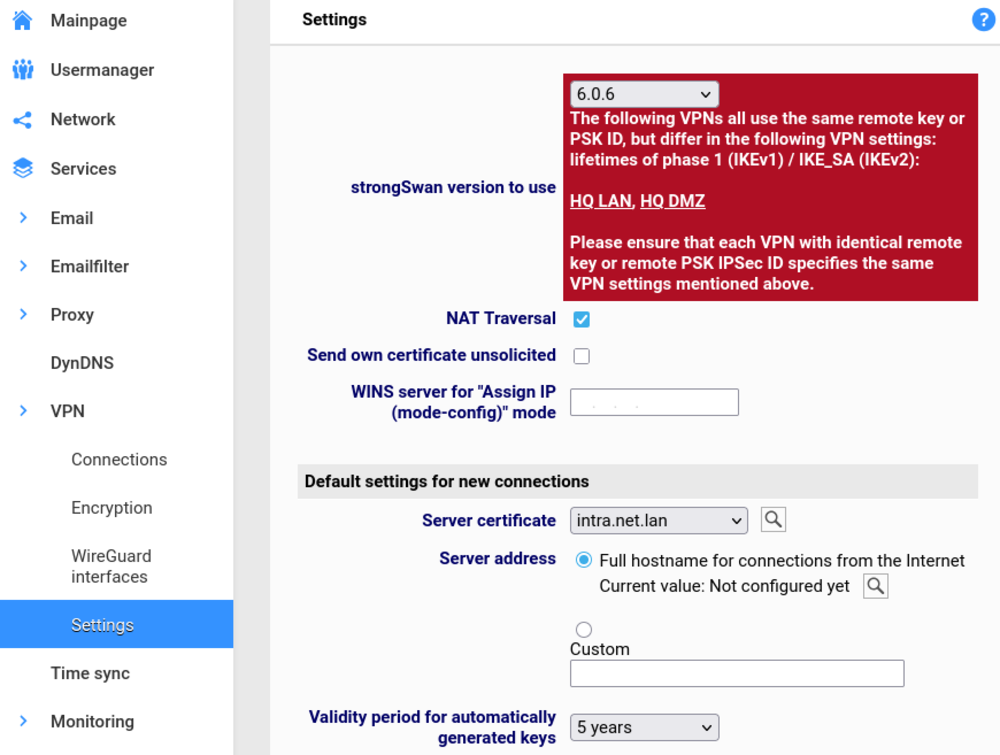
To resolve the issue, first make a note of all the connection names listed in the error message. Review the settings for these connections, paying particular attention to those mentioned in the error message. The settings should differ only in the tunnel settings. Save the corrected settings and repeat this process until the warning no longer appears. Then try changing the strongSwan version again.