Table of Contents
If multiple clients on a remote network are to be connected to a network behind the Intra2net system (e.g. in a branch office), it is generally more practical to establish a VPN between the two networks instead of setting up a single VPN for each of the clients.
The VPN is then established between the Intra2net system and an IPSec gateway ahead of the other network. This IPSec gateway can be an Intra2net system, but it can also be another compatible product.
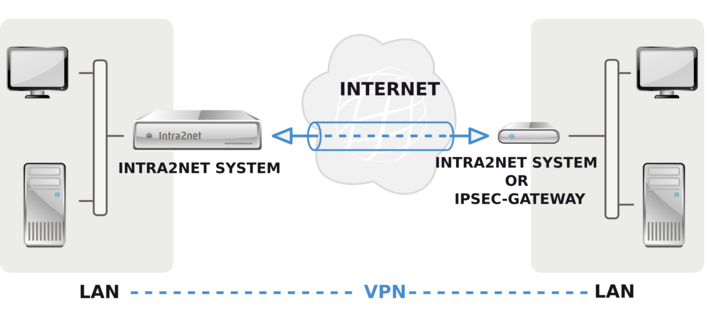
Networks with private IP addresses can also be connected via a VPN tunnel. However, these IP addresses are still used for addressing. Therefore, you cannot directly connect networks with identical or overlapping network ranges via VPN. In the event of an IP address conflict, you can use the methods described in 53. Chapter, „Solving IP Address Conflicts in VPNs Through NAT“.
Make sure that the Intra2net system and the IPSec gateway at the remote peer are assigned their own official IP addresses whenever possible and are not located behind a router that performs NAT. While a VPN behind a NAT router is possible, it requires additional configuration in the form of port forwarding. Furthermore, the stability and reliability of the VPN connection depend on the quality of the NAT implementation on the router(s).
It is not necessary to use dedicated IPs. Dynamic IPs with DynDNS can be used on one or both sides without difficulty.
It is recommended that you configure the VPN so that both sides can initiate the connection on their own. Experience has shown that this improves stability and ensures that the VPN connection is automatically reestablished as quickly as possible if one side’s internet connection is interrupted. It also simplifies the use of fallback internet connections for the VPN.
A connection configured on the Intra2net system links a network at the remote site to a network behind the Intra2net system. If you want to connect multiple networks, you can configure a separate connection for each network combination. Be sure to always use the same combination of keys/certificates for each of these connections. To do this, it is best to use the "" button and then customize the copied connection.